Set the real capacity
Put your service areas, driving and visit requirements on the Booking Board. Choose slots the team can keep.
 DENIS BUBENÍKBUSINESS. IN PRACTICE.Watch the free video
SITE VISIT BOOKED IN ONE CALL
Set real visit options for your area, confirm the choice in writing, and make every time change clear. Build a booking routine the office and tech can follow from the same information.
24 months of access · 14-day refund
THE PROBLEM IN THE WORK
The customer is waiting for a time, the office is working out the route, and the tech may still have the old booking. This course helps you prepare the choices before the call and keep the chosen time, confirmation and changes together.
Build the starting point. Test it on a job of your own.
See what you finishWHAT YOU LEAVE WITH
Follow the walkthroughs and adapt the materials to the work you do. Each part has a practical finish you can check.
Work out what fits before offering a time. Fixed zone days on paper are recommended practice; you set them from your own travel, staffing and visit needs.
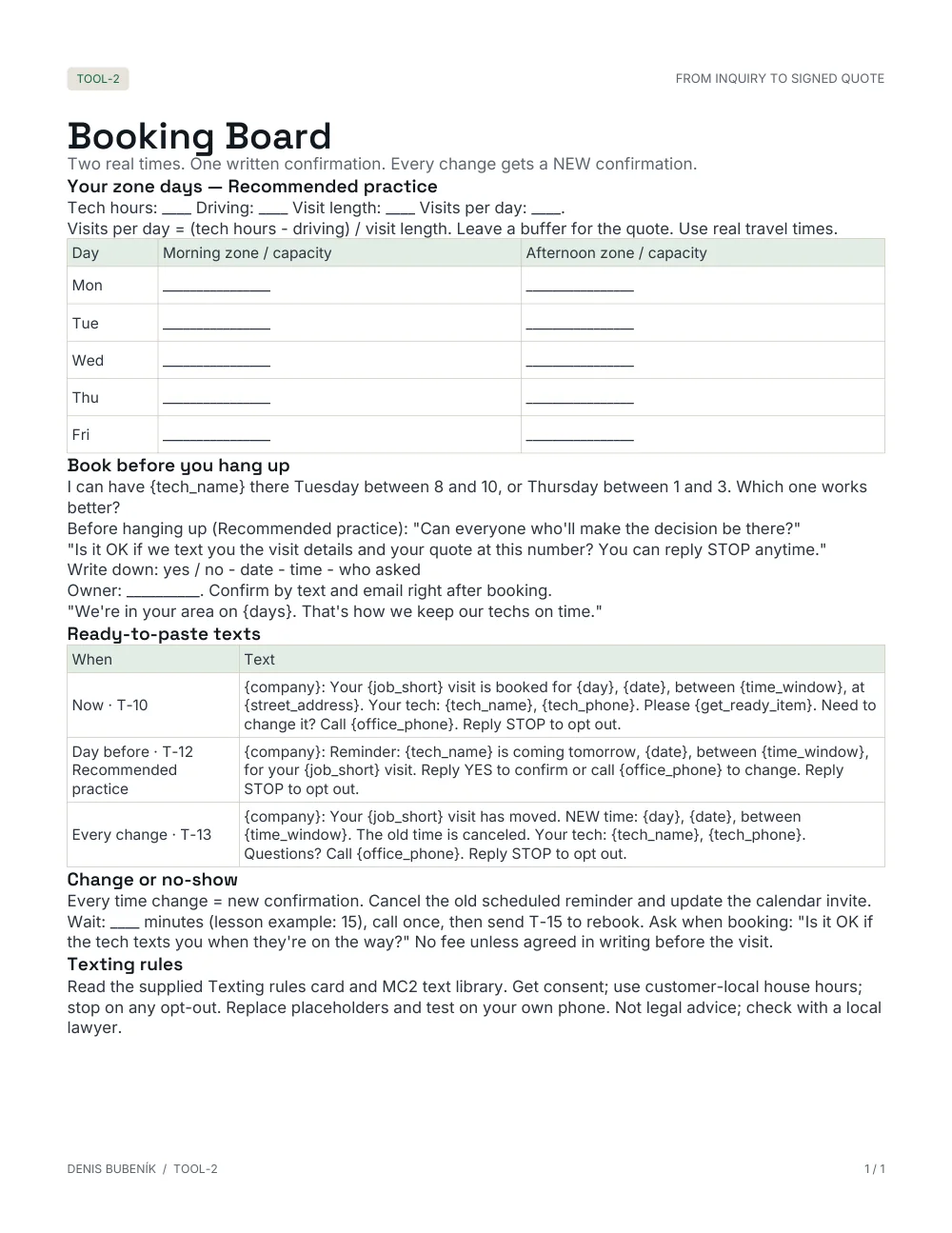
WORK WITHBooking Board
Offer times you can actually keep, record the chosen slot and name the booking owner. The customer does not need a second call just to hear the first available choices.
WORK WITHBooking words
Prepare the date, time window, address, person coming and change instructions. Test the message and calendar information against the booking record.
WORK WITHConfirmation text and email
Every change gets a fresh confirmation. The day-before reminder is recommended practice: replace the old reminder when a visit moves, so an outdated time is not left in the sequence.
WORK WITHTime-change and reminder words
This recommended no-show routine gives the tech and office a next step. Agree any no-show fee in writing beforehand; the course does not introduce an automatic charge.
WORK WITHOn-my-way and rebooking words
LOOK INSIDE THE ACTUAL MATERIALS
Use the working material while you follow the lesson. Adapt it to your business. These are blank source samples, not customer or student results.
Keep the original templates. Print a blank copy before you start, or work in the editable format supplied.
FROM THE LESSON TO YOUR WORK
 FROM FAMILY INSTALLATION BUSINESSES IN SLOVAKIA AND THE CZECH REPUBLIC.
DENIS BUBENÍK · OPERATOR & COURSE CREATOR
I run operations in our family's installation businesses in Slovakia and the Czech Republic. We install air conditioning, heat pumps and solar. These courses bring together our workflow and the practices I would add for a business in the US or Canada.
Our practice means what runs in our family company. Recommended practice means what I would add or adapt for a US or Canadian business. Fixed zone days, the day-before reminder and the no-show routine are Recommended practice.
Site visit booked in one call
24 months of access (731 days).
One business and its own staff.
Self-paced. You adapt and test the materials. No setup service, coaching or live calls.
BEFORE YOU START
Use paper, a spreadsheet or the tools you already have. The lessons and materials teach the workflow. A software account or texting service is not included.
You follow the lessons, adapt the materials and test them on your own work. No setup service, coaching, live calls or personal quote review is included.
The business licence covers one business, its own locations and its own staff. It does not cover agency clients, other companies or resale.
Have the appropriate local professional check your wording, terms and required notices. The course is not legal advice or technical installation training.
Full refund within 14 days of purchase, no questions, including after viewing or downloads. Existing course purchases have 24 months of access (731 days), not lifetime.