Capacity & scheduling
Check available capacity, committed work, readiness and a sensible reserve.
 DENIS BUBENÍK
JOB DELIVERY TOOLKIT
For a team with client work to schedule or deliver, where missing inputs or incomplete handover keep interrupting the plan. Check one upcoming job before confirming its slot.
THE DAILY FRICTION
The calendar looks full, but jobs are not ready. Someone is missing the inputs, schedules keep moving, and the last piece of paperwork follows the team home.
The working result: One upcoming job is marked ready or has a precise missing-input action. After the work, use a separate handover check for actual scope, records and unresolved items.
HOW YOU USE IT
You get guided materials for practical work. Tools and templates stay with their task, so you can return to the same context.
Your purchased workspace keeps the toolkit, topic and current step visible. Start with one real quote, job or task.
Open the matching calculator, register or template beside the guide. Complete the current working output before moving on.
Review the same measure after using the routine. Keep a JSON backup where the tool supports it; a checked reading step is not a business result.
Use the online workspace on phone or desktop. Extract the downloadable ZIP on a computer for an offline copy. Reading progress is saved in this browser, separately from your tool data. Sign-in does not synchronise working data between devices.
LOOK INSIDE
The first image shows an actual working register with labelled synthetic records. The other previews explain the workflow and included files. These are illustrations, not customer results.
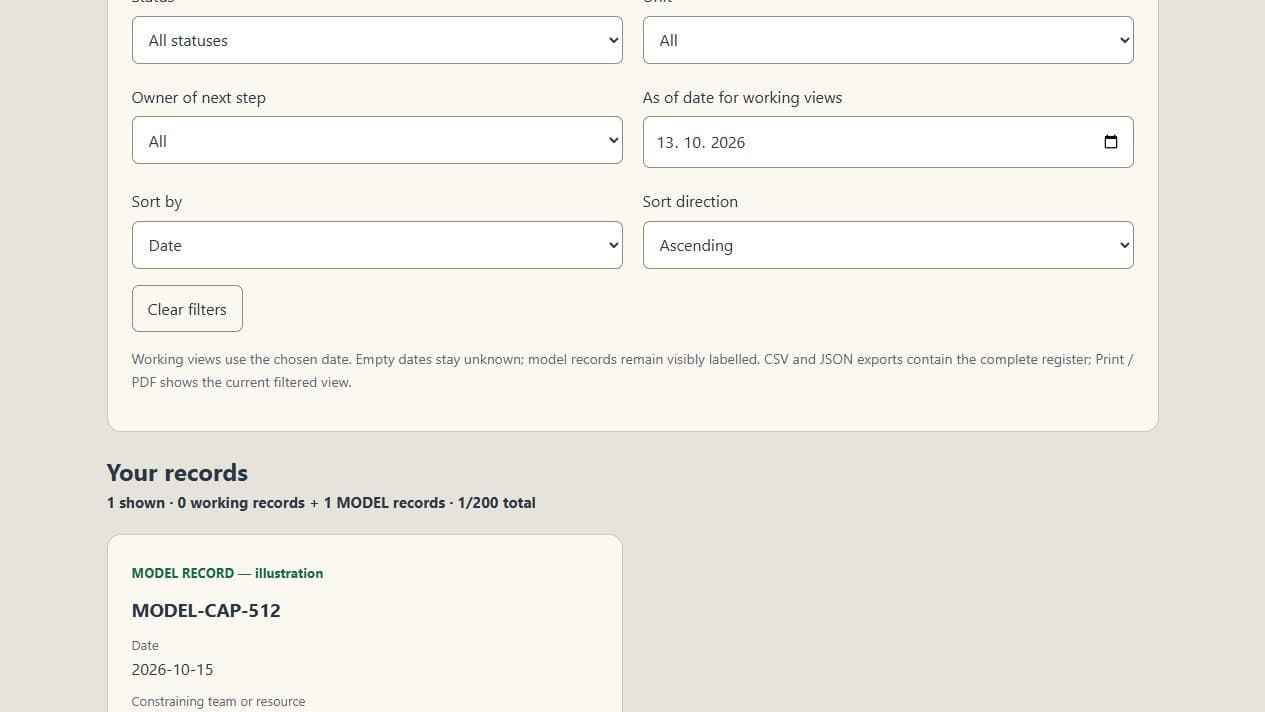
Actual toolkit register with labelled synthetic records. This shows the working view, not customer data or a measured business result.
INCLUDED MODULES
Each module includes a full guide, calculator, register with relevant working views, blank and model CSVs, and copy-ready templates. The toolkit also includes a saved implementation checklist, weekly scorecard and baseline/review worksheet.
Check available capacity, committed work, readiness and a sensible reserve.
Use one input checklist with clear sources and responsibility for missing items.
Record the work, documents and unresolved items before marking the job complete.
Choose one upcoming job. Check its agreed scope, access, qualified people, materials and approvals. Mark it ready or write one consolidated missing-input request with an owner and deadline before confirming the slot.
Record your starting point, choose an owner, then review the same measure after using the manual routine. The tools do not send messages or install automations. Actual outcomes depend on your inputs, use and the change you test.
A USEFUL FIT WHEN
SCOPE
The toolkit gives you the method and working resources. Your team supplies the inputs and puts the changes into use.
Not included
BEFORE YOU CHOOSE
An English guided workspace that keeps your toolkit, topic and step visible, plus an implementation checklist with explicit browser save and JSON export, a weekly scorecard with save and backup, and a baseline/review worksheet. Each listed module includes a full guide, a calculator, a browser register with relevant working views, blank and labelled model CSVs, and copy-ready templates. A versioned ZIP brings the files together.
These are manual working routines. You adapt a template, assign the work, check the exception and record the result. The tools do not connect apps, send messages or install an automation. Software setup and integrations require a separate written scope.
No. You can read the guides and use the browser tools without either. CSV files are optional. Use the online version on your phone and extract the ZIP on a computer. Your tool and register data stays in the browser; use JSON exports to back it up or move it between devices.
Your purchase includes 731 days of paid online access, at least 24 months, under the purchase terms. Downloaded materials remain available for internal use under the licence. Community participation has separate terms.
This is a self-guided toolkit. If you want help implementing a workflow, contact Denis about a separately scoped project. You can request implementation without buying a toolkit first.
Your previous purchase keeps its original materials, access and terms. Contact denis@nexorio.io before buying a toolkit with overlapping content. An automatic credit or upgrade has not been offered.
No. The English peer community is separate and optional, with free entry when registration is available. Registration is currently closed. Paid toolkit files, private consulting and implementation are separate; community participation is not required for access or a refund.
Consumers and business buyers can request the full contractual refund within 14 days from contract formation, including after opening or downloading the materials. Use the private refund form. Posting in the community is never required. Mandatory buyer rights remain unchanged. Open the refund form →
START SMALL
Use the free diagnostic and observation map to investigate one real case. Choose a toolkit only when its routine matches the issue. Buying nothing is valid. You can also bring a specific workflow directly for a separately scoped implementation.